

 GbxDump
Homepage
Software,
Download
WR-Tools
Analoge
Filter
BmpHeaderViewer
Systeminfo
GbxDump
Windows
CE
GbxDump
- Version 1.76 (Freeware)
Copyright
© 2010-2024 by Electron
This tool indicate the contents of the file header of Maps, Challenges, Replays, Packs, Blocks, Objects and Items used by the Nadeo game engine (GameBox).
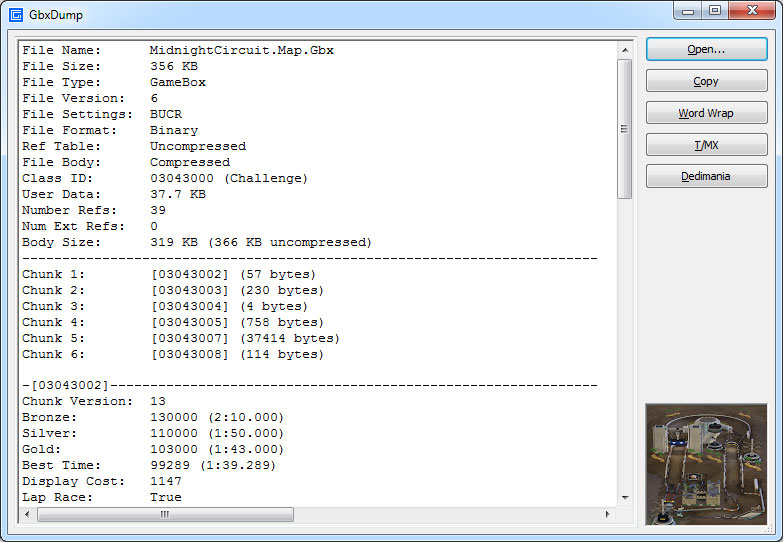
After
installation the context menu of GameBox (Gbx) files has
an additional entry "GbxDump". Using this
command you can view into this Gbx file.
You can also run the tool from the start menu and open
any Gbx file within the program (Start » Programs » Gbx File Dumper).
Nevertheless, the easiest way is to use drag-and-drop
from Microsoft Windows Explorer. Then several files can
immediately be analyzed at once.
Main
features:
- Displays general track properties
- Displays external dependencies
- Displays the author comment
- Shows and exported the thumbnail
- Online interface to the TMX and MX trackbase
- Online interface to the Dedimania records database
- Open source
Download of GbxDump 1.76
Filename:
gbxdump.zip
Filesize: 1.94 MB
Filetyp: ZIP archive
Release: March 2024
Language: German, English
Games: Nadeo Virtual Skipper, TrackMania,
Trackmania Turbo, ManiaPlanet, Trackmania 2020
OS Versions: Windows XP SP3/Vista/7/8/8.1/10/11
 Homepage »
Software,
Download » GbxDump
Homepage »
Software,
Download » GbxDump